
Industry 4.0
Industry 4.0 is Here
Industry 4.0 has arrived and with the promise of fully connected, dynamic, and automated operations. This digital transformation inspires a need to create data-driven and customer-centric organizations to fulfill these goals.
Transform your operations with a Digital Twin
The digital transformation process is often looked at as expensive and complicated, when today new cost-effective technologies have arrived to help create visibility, control, and solutions. Logidot is here to support your operation on this digital transformation journey through our state-of-the-art sensors, IOT platform, and services.
Hover or select a zone, vehicle or sensor to explore the twin
How Logidot Works
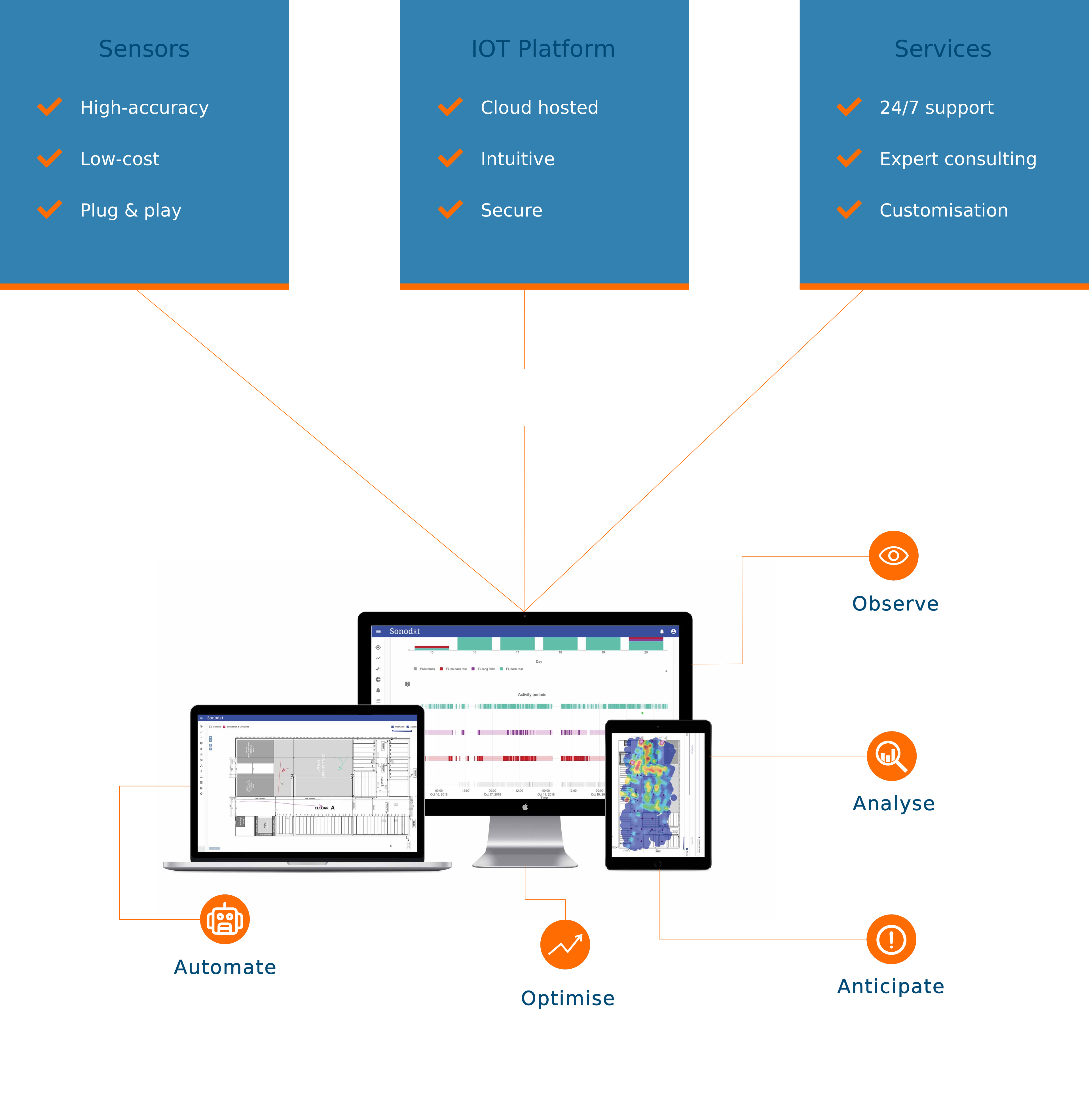
Industry 4.0 is about digitally connecting physical assets, people and processes through sensors to the cloud and creating a digital twin of your operations. The collected data can be analysed to help operators make smarter decisions and enable process automation.
-
01
Sense
Plug & play sensors on vehicles, pallets and people continuously measure their precise position on the shop floor.
-
02
Mirror
Every movement streams to the cloud and is recreated as a live digital twin: your whole operation on one map, as it happens.
-
03
Decide
The control tower analyses the live picture and its history, surfacing congestion, idle equipment, safety risks and opportunities to improve.
-
04
Act
Insights return to the floor as alerts, reports and optimised routes and schedules, closing the loop between the physical and the digital.
Your Control Tower
01
Observe
Observe all events in real-time as they happen in your warehouse with Live View or analyse past events with Time Machine.
02
Analyse
Keep Keep track of your KPIs and analyse your operations both spatially and numerically to identify improvement opportunities.
03
Anticipate
Detect safety hazards and dangerous behaviors such as near-collisions. Maintain your fleet proactively.
04
Automate
Gain peace of mind by automating supervision. Our Rules feature helps you customise rules and detect anomalies. Our automated Reporting tool gives you the means to share relevant information with all stakeholders.
05
Optimise
Harness the power of our predictive and optimisation tools. Strategic stock allocation, dynamic routing and scheduling.
Benefits
Real-time Visibility
All the data you need past, present and future at your fingertips.

Improved Safety
Keep your employees safe from injuries and harm by proactively identifying hazardous behavior and danger zones.

Reduction of idle and throughput times
Real-time analysis of activity for optimised scheduling, routing, interleaving, and stock placement.
Better equipment and resource utilisation
Right-size your fleet and identity wasteful processes.

Increased uptime
Anticipate disruptions to your operations with predictive maintenance.

Process accuracy
Monitor processes and detect deviations.
Improved training time and compliance
Faster onboarding and simplified safety compliance monitoring.

Lower operating costs
Seamless operations monitoring means better use of your company resources.
How It Works
Sensors
- High-accuracy
- Low-cost
- Plug & play
IOT Platform
- Cloud hosted
- Intuitive
- Secure
Services
- 24/7 support
- Expert consulting
- Customisation
Deployment
-
01
Survey
After understanding your needs our engineers survey your environment and equipment.
-
02
Plan
We plan and propose a custom solution to best match your needs.
-
03
Install
Our team installs the hardware and software seamlessly connecting to your current WMS systems and becoming your warehouse control tower.
-
04
Support
We are here to support your software and hardware need with our customer service team.
Plan
How many anchors does a warehouse need?
Anchors are wireless boxes on the walls and the columns. A tag has to be in sight of three of them before the platform can place it — which is why the answer depends on where the racking is, not on how many square metres you have. Put one anywhere on the floor below, and watch the hall light up.
The floor is drawn with JavaScript. With it on, you can stand anchors on this hall and watch the coverage follow.
- Sharp fix
- Located
- Blind spot
- Anchor
Tap or click the floor to stand an anchor. Do it again to take it down. Drag one to move it.
From the keyboard: arrow keys move the crosshair, Enter stands an anchor, Delete takes one down.
- Floor covered
- —%
- Anchors
- —
A real survey is more than this: it measures mounting heights, how full the racking is, where power and network already run, and the mast that drives through the signal all day. This is the idea of it, on one empty floor.